An alignment on your own page, static first
A web page that mounts the viewer as it loads asks every reader for 452 KB of gzipped JavaScript before the first residue draws, including a reader who only scrolls past. A page that shows the first frame as an SVG and loads the viewer on request sends 8 KB instead. For the NLRP1 family that A protein family from a list of accessions builds, we:
- write one props file for both views
- draw the first frame as an SVG
- put the SVG on a page and load the viewer on a click or on scroll
- measure both pages with Lighthouse
- check that the swap moves nothing on the page
Prerequisites
- Node.js 18 or later, which brings the
npxthat fetches react-msaview-cli, serve and Lighthouse:apt install nodejs, orbrew install node - Chrome or Chromium, for Lighthouse in step 6:
apt install chromium, orbrew install --cask google-chrome
The data
The twelve NLRP1 orthologs, their ClustalW tree and their InterPro 110.0 domain matches, as the protein family tutorial writes them. Nothing to download: the CLI and the viewer fetch these by URL from the props file of step 1.
| What it is | File |
|---|---|
| The alignment, 12 rows over 1666 columns | nlrp1.aln |
| Its tree | nlrp1.nh |
| Its domains, InterPro 110.0 Pfam matches | nlrp1-domains.gff |
The files this page writes, hosted for the figure links
| What it is | File |
|---|---|
| The props of step 1 | nlrp1.json |
| The first frame of step 2 | nlrp1.svg |
| The page of steps 3 and 4 | index.html |
| The same page with the viewer mounted as it loads | live.html |
1. Write one props file for both views
The CLI reads MSAViewer props through --props and the viewer through
mount(), so one JSON file describes both the figure and the live view. Save
this as nlrp1.json:
{
  "msaUrl": "https://gmod.org/JBrowseMSA/demo/data/nlrp1.aln",
  "treeUrl": "https://gmod.org/JBrowseMSA/demo/data/nlrp1.nh",
  "gffUrl": "https://gmod.org/JBrowseMSA/demo/data/nlrp1-domains.gff",
  "height": 360,
  "hideHeader": true
}
height is the viewer’s full height in pixels, tracks included, and
hideHeader leaves out the toolbar. Any prop but a callback can go in the file,
and Embedding lists them.
2. Draw the first frame with the CLI
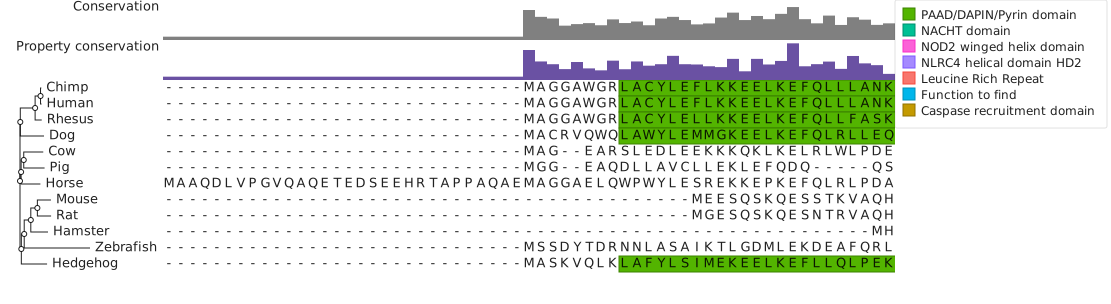
npx react-msaview-cli@9.1.1 export-svg --props nlrp1.json --viewport --width 900 -o nlrp1.svgThe CLI fetches the three files and draws the view 900 by 360 pixels with no
browser. --viewport limits the drawing to the frame the viewer opens on, where
the default is all 1666 columns. The build script printed a 1111 by 304 SVG of
118,981 bytes, 6,618 gzipped.
3. Put the figure on the page
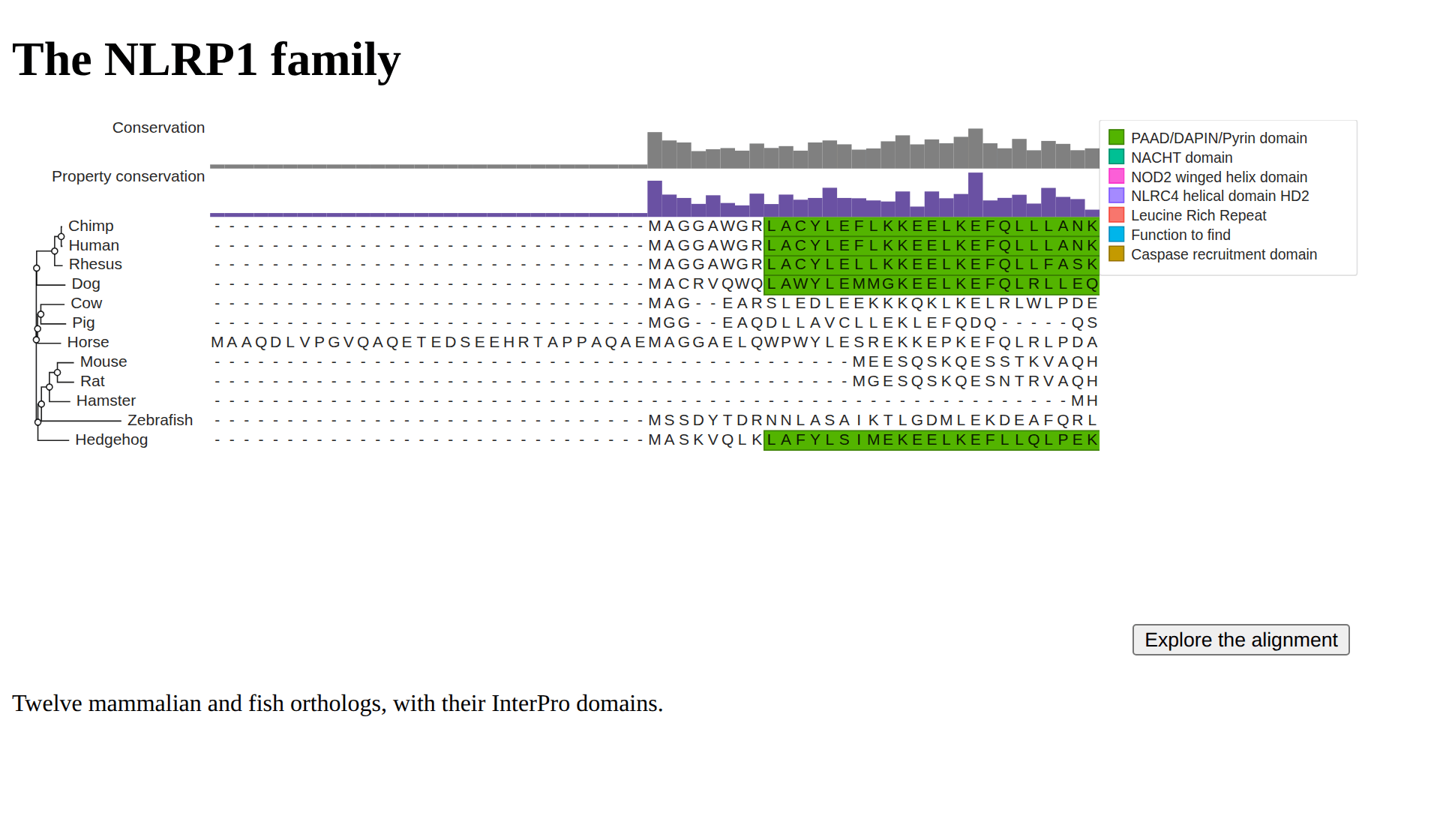
The page shows the SVG, with a button over its corner, in a box as tall as the live view: the props’ 360 pixels for the viewer and 5 for the divider under it.
<style>
  .msa-embed {
    position: relative;
    max-width: 900px;
    height: 365px;
  }
  .msa-embed > img {
    display: block;
    max-width: 100%;
    max-height: 100%;
  }
  .msa-explore {
    position: absolute;
    right: 8px;
    bottom: 8px;
  }
</style>

<div class="msa-embed" data-props="nlrp1.json">
  <img
    src="nlrp1.svg"
    alt="Twelve NLRP1 orthologs aligned under their tree, with the PAAD/DAPIN/Pyrin domain filled green"
  />
  <button type="button" class="msa-explore">Explore the alignment</button>
</div>- The box keeps its 365 pixels when the viewer replaces the image, so the text under it stays put.
max-width: 100%scales the SVG to the box, and on a phone to the screen: Lighthouse’s mobile run drew it 396 pixels wide.- The rules name
.msa-exploreand.msa-embed > img, because a rule on.msa-embed buttonalso reaches the viewer’s own buttons and stacks its track menus in the Explore button’s corner.
4. Load the viewer on a click
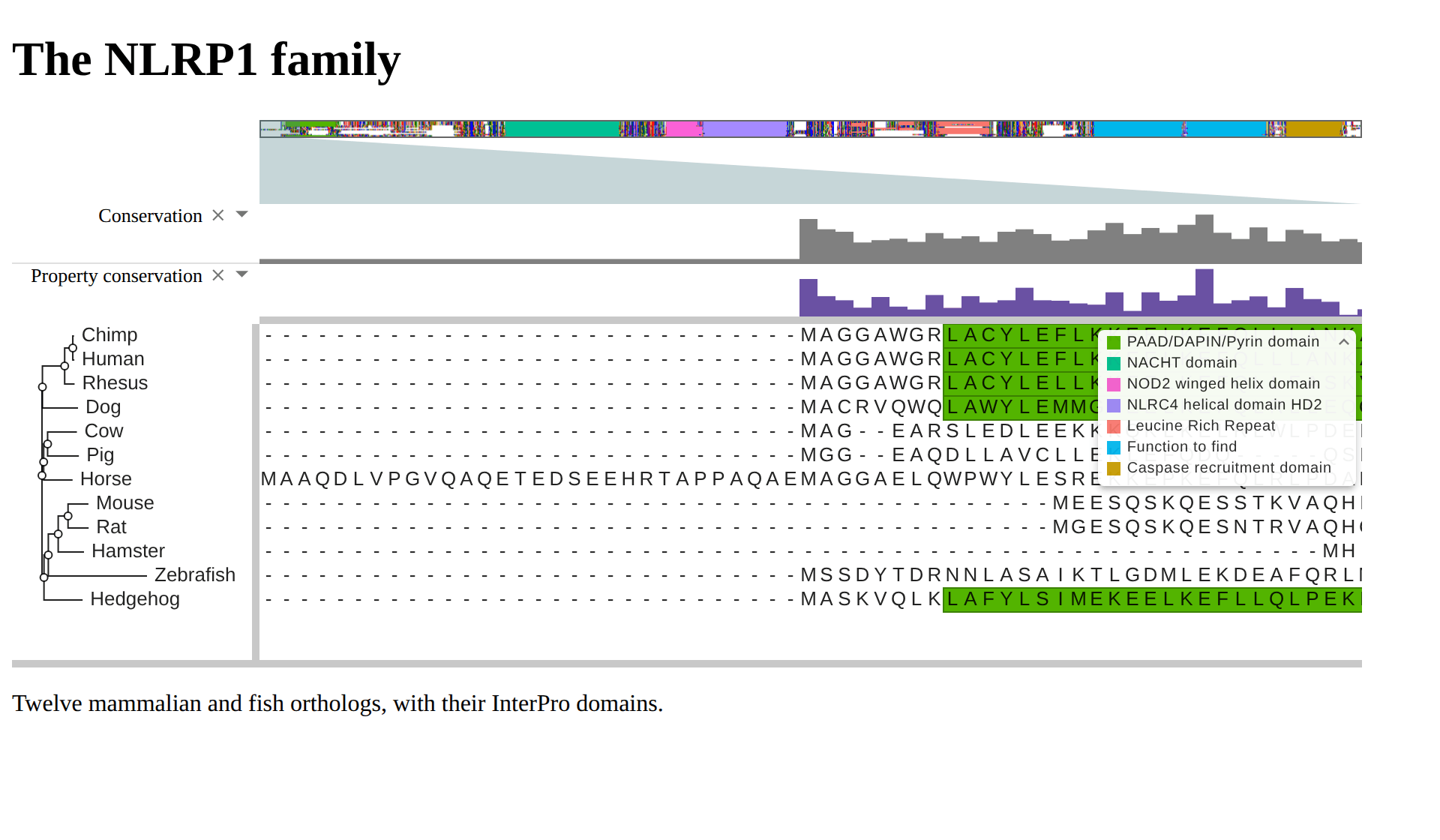
On the reader’s click, the script fetches the bundle and the props, empties the box and mounts the viewer into it:
const bundle = 'https://unpkg.com/react-msaview@9.1.1/bundle/index.js'
let bundleLoaded

function loadBundle() {
  bundleLoaded ??= new Promise((resolve, reject) => {
    const script = document.createElement('script')
    script.src = bundle
    script.onload = resolve
    script.onerror = () => {
      script.remove()
      bundleLoaded = undefined
      reject(new Error('the viewer bundle did not load'))
    }
    document.head.append(script)
  })
  return bundleLoaded
}

async function explore(box) {
  const button = box.querySelector('.msa-explore')
  button.disabled = true
  button.textContent = 'Loading…'
  try {
    const [props] = await Promise.all([
      fetch(box.dataset.props).then(res => res.json()),
      loadBundle(),
    ])
    box.replaceChildren()
    window.ReactMSAView.mount(box, props)
  } catch {
    button.disabled = false
    button.textContent = 'Explore the alignment (retry)'
  }
}

for (const box of document.querySelectorAll('.msa-embed')) {
  box.querySelector('.msa-explore').addEventListener('click', () => {
    explore(box)
  })
}
loadBundle keeps one promise, so a page with several boxes downloads the
bundle once. A failed download drops the promise and re-enables the button, so
the next click tries again.
ggmsaview gives an R Markdown or Quarto
page the same two forms: a chunk that prints msaview_plot(w) puts a ggplot2
PNG on the page, and one that prints w puts the widget, bundle included:
library(ggmsaview)
w <- msaview(
  msa = "https://gmod.org/JBrowseMSA/demo/data/nlrp1.aln",
  tree = "https://gmod.org/JBrowseMSA/demo/data/nlrp1.nh",
  gff = "https://gmod.org/JBrowseMSA/demo/data/nlrp1-domains.gff"
)
w
ggplot2::ggsave("static_first-r.png", msaview_plot(w), width = 10, height = 4)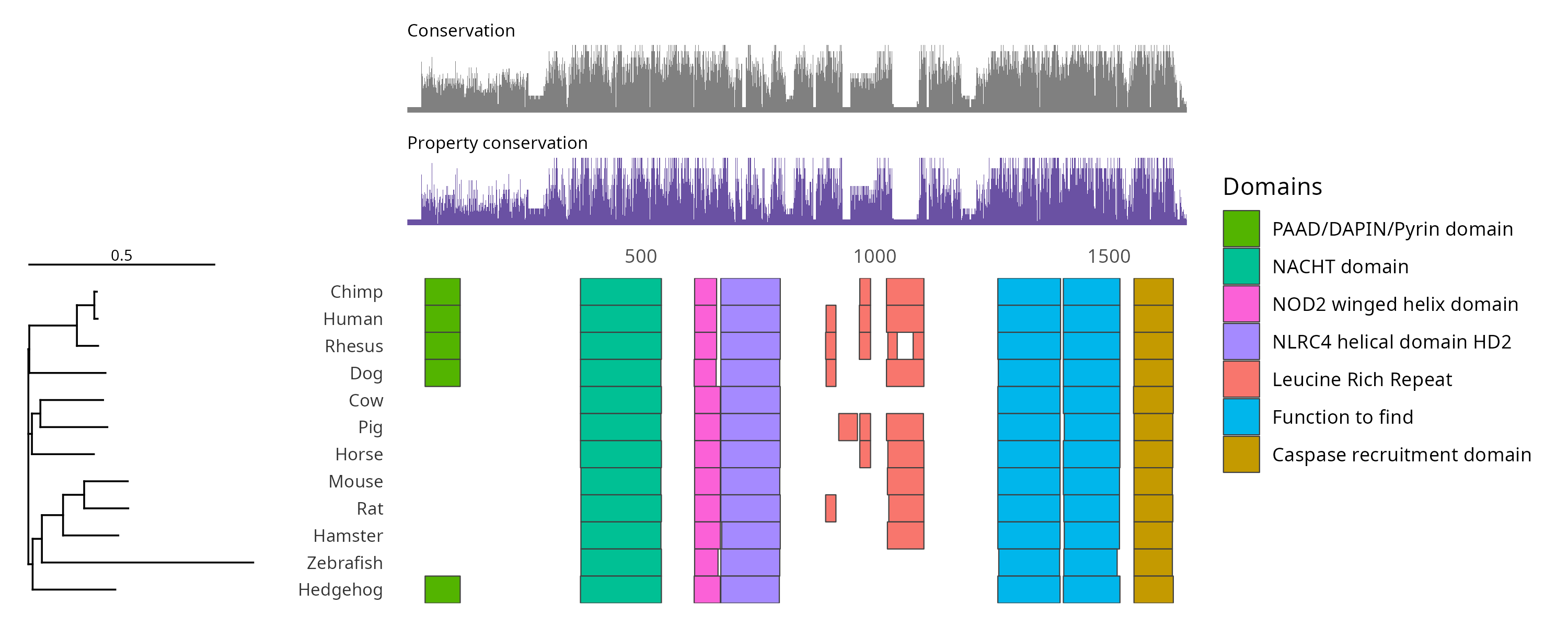
5. Load the viewer when the figure scrolls into view
To start the download as the box nears the viewport, replace the click handler of step 4 with this loop:
const nearby = new IntersectionObserver(
  entries => {
    for (const entry of entries) {
      if (entry.isIntersecting) {
        nearby.unobserve(entry.target)
        explore(entry.target)
      }
    }
  },
  { rootMargin: '200px' },
)
for (const box of document.querySelectorAll('.msa-embed')) {
  nearby.observe(box)
}
The capture script for this page’s figures serves the page with the box 2000 pixels down and counts the requests for the bundle:
scroll page at load: 0 bundle requests
scroll page after scrolling: 1 bundle requests
6. Measure both pages
live.html is the same page with the bundle in a deferred script tag and the
viewer mounted as the page loads. The build script serves both pages gzipped and
runs Lighthouse’s mobile profile, an emulated mid-range phone on slow 4G, over
each:
npx serve@14.2.6 -l 8123 . &
npx lighthouse@13.5.0 http://localhost:8123/ --only-categories=performance --throttling-method=devtools
npx lighthouse@13.5.0 http://localhost:8123/live --only-categories=performance --throttling-method=devtools| Lighthouse, mobile | index.html | live.html |
|---|---|---|
| Bytes transferred | 8 KB | 455 KB |
| Speed Index | 1115 ms | 4810 ms |
| Largest contentful paint | 1407 ms, the SVG | 635 ms, the paragraph |
| Total blocking time | 73 ms | 837 ms |
| Cumulative layout shift | 0 | 0 |
Speed Index counts the viewer’s canvases and largest contentful paint does not,
so on live.html the latter records the paragraph under the box, which paints
seconds before the alignment. The times vary by a few hundred milliseconds from
run to run.
7. Check the swap
The capture script prints the box’s height and the top of the paragraph under it before and after the click:
before the click: box 365 px, paragraph at 460.875 px
after the click: box 365 px, paragraph at 460.875 px
Lighthouse’s layout shift of 0 covers the image arriving and the viewer mounting as each page loads, and the lines above cover the click. The SVG and the live view also open on the same columns: both start at column 1, where Horse is the one row with a residue, with the green PAAD/DAPIN/Pyrin cells at the same column in the same five rows.
Reproduce it end to end
build_static_first.sh
runs the commands above in order:
- It writes the props file naming the NLRP1 alignment, tree and domains by URL.
- It draws the first frame with
react-msaview-cli export-svgand prints the SVG’s size beside the bundle’s. - It writes
index.html, which loads the viewer on a click, andlive.html, which loads it as the page loads. - It serves both pages gzipped and runs Lighthouse’s mobile profile over each.
It needs the tools under Prerequisites. Set CHROME_PATH when
Lighthouse does not find Chrome on its own.
curl -O https://raw.githubusercontent.com/GMOD/JBrowseMSA/main/docs/tutorials/scripts/build_static_first.sh
bash build_static_first.sh out/
The script writes the four hosted files into out/ and prints the numbers
quoted here.
See also
References
- Google Chrome team. Speed Index. Chrome for Developers, developer.chrome.com/docs/lighthouse/performance/speed-index.
- Walton P, Mihajlija M. Cumulative Layout Shift (CLS). web.dev, web.dev/articles/cls.