A protein family from a list of accessions
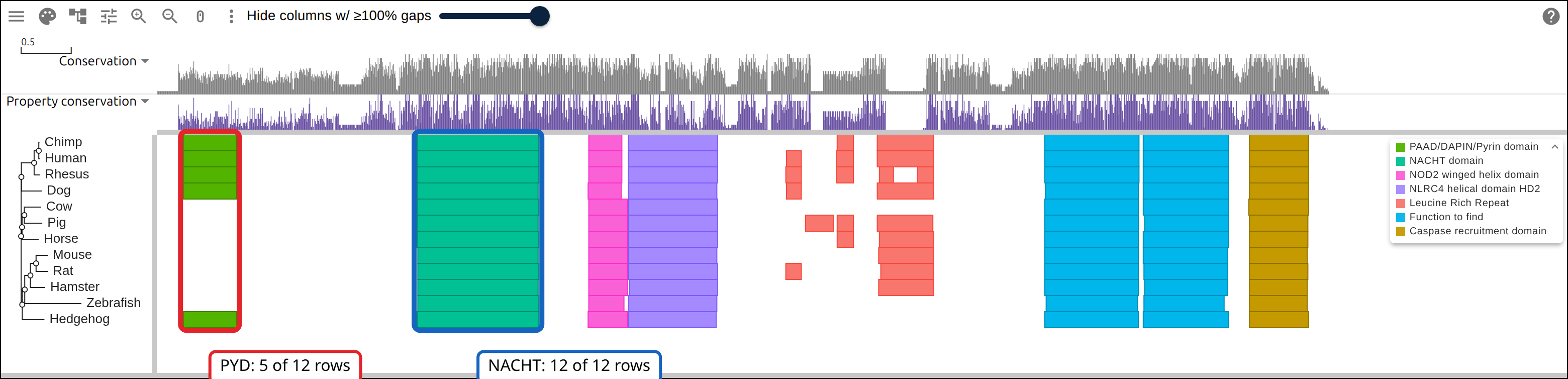
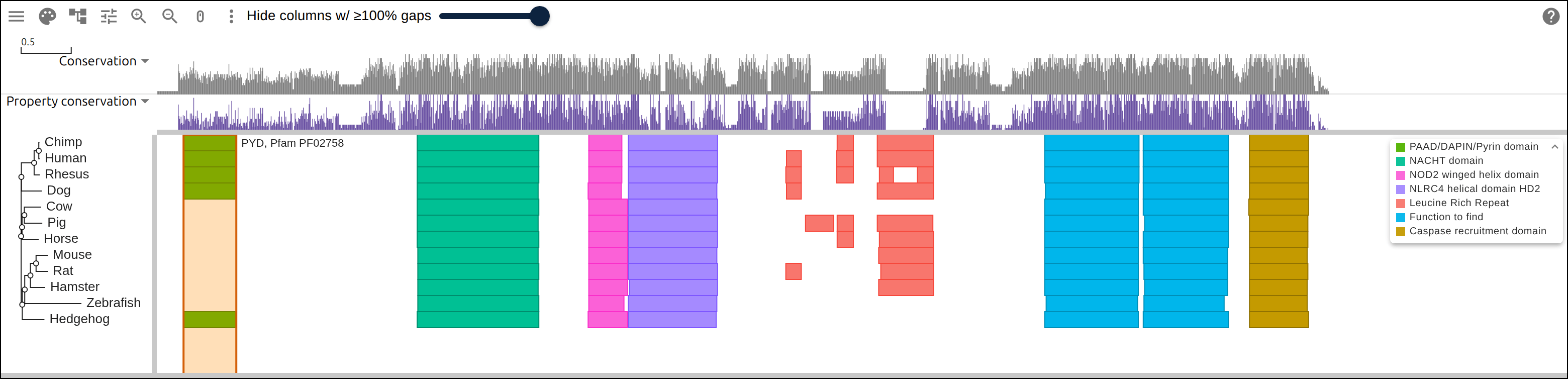
Human NLRP1, an inflammasome sensor, starts with a pyrin domain (PYD) of about eighty residues that the mouse protein lacks. Aligned with its orthologs, the domains every vertebrate copy shares fall in one band of columns each, and a missing PYD shows as blank space. For twelve NLRP1 orthologs named by UniProt accession, we:
- fetch the sequences and align them
- infer a tree from the alignment
- look up the Pfam domains in InterPro and open the three files together
- filter the overlay to the PYD and check it against the GFF
- share the view as one link
Prerequisites
curl- ClustalW,
apt install clustalwon Debian or Ubuntu,brew install clustal-won macOS. ClustalW both aligns and infers a tree, so this page needs no other aligner. - react-msaview-cli,
npm install -g react-msaview-cli, NodeJS v22+
The data
Twelve NLRP1 orthologs as UniProtKB holds them, with Pfam matches from InterPro release 110.0. Nothing to download: the commands below fetch these.
| What it is | File |
|---|---|
| One protein sequence per accession, for example | Q9C000.fasta |
| Precomputed Pfam matches per accession, for example | Q9C000 |
The files this page writes, hosted for the figure links
| What it is | File |
|---|---|
| The twelve sequences before alignment, right-padded to one width | nlrp1-unaligned.aln |
| The alignment | nlrp1.aln |
| Its tree | nlrp1.nh |
| Its domains | nlrp1-domains.gff |
1. Name the rows
Write one accession per line, followed by the label you want down the side of the viewer. The label becomes the FASTA defline, the tree tip, and the first column of the domain GFF.
Q9C000	Human
H2QC06	Chimp
A0A1D5QWR0	Rhesus
A0A8I3MJ75	Dog
A0ABM3YGI7	Hedgehog
E1BNN6	Cow
K9IW94	Pig
A0A9L0RFW2	Horse
Q2LKU9	Mouse
D9I2G4	Rat
A0ABM2XMM7	Hamster
A0A386CAB9	Zebrafish
Save that as accessions.tsv, with a tab between the two columns.
2. Fetch the sequences
# read each accession and write one FASTA record named by its label, which is
# what the viewer draws down the side
while IFS=$'\t' read -r accession label; do
  printf '>%s\n' "$label" >> family.fasta
  curl -sf "https://rest.uniprot.org/uniprotkb/$accession.fasta" |
    tail -n +2 | tr -d '\n' >> family.fasta
  printf '\n' >> family.fasta
done < accessions.tsv
tail -n +2 drops UniProt’s defline, and tr -d '\n' unwraps the sequence onto
one line. Check the lengths before aligning:
awk '/^>/{name=$0; next}{print name, length($0)}' family.fasta>Human 1473
>Chimp 1471
>Rhesus 1537
>Dog 1432
>Hedgehog 1360
>Cow 1410
>Pig 1294
>Horse 1465
>Mouse 1182
>Rat 1218
>Hamster 1143
>Zebrafish 1355A truncated fragment or a stray isoform would show here as an outlier length.
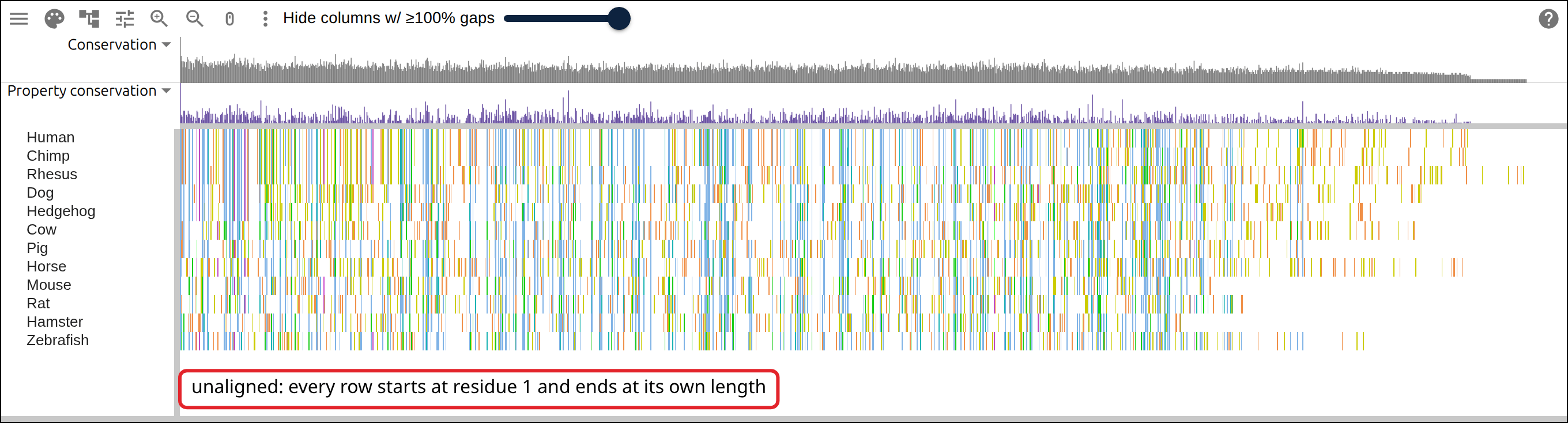
The viewer opens unaligned sequences once every row is the same length, so
right-padding the shorter ones loads family.fasta as twelve rows.
3. Align them
clustalw -INFILE=family.fasta -ALIGN -TYPE=PROTEIN \
  -OUTPUT=FASTA -OUTFILE=family.afa
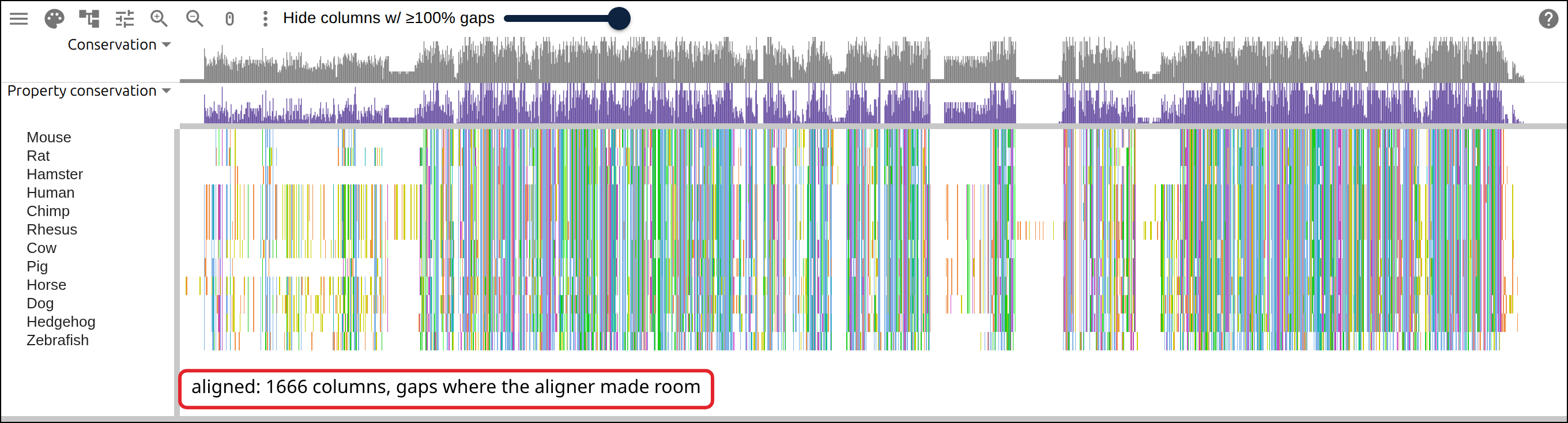
ClustalW finishes in under two seconds and reports Alignment Score 258590 over
1666 columns, 129 more than the longest input.
4. Infer a tree
# -TREE reads an existing alignment and writes neighbor-joining Newick
clustalw -INFILE=family.afa -TREE -TYPE=PROTEIN -OUTPUTTREE=phylip

# ClustalW wraps the Newick across many lines; the viewer wants one string
tr -d '[:space:]' < family.ph > family.nwk
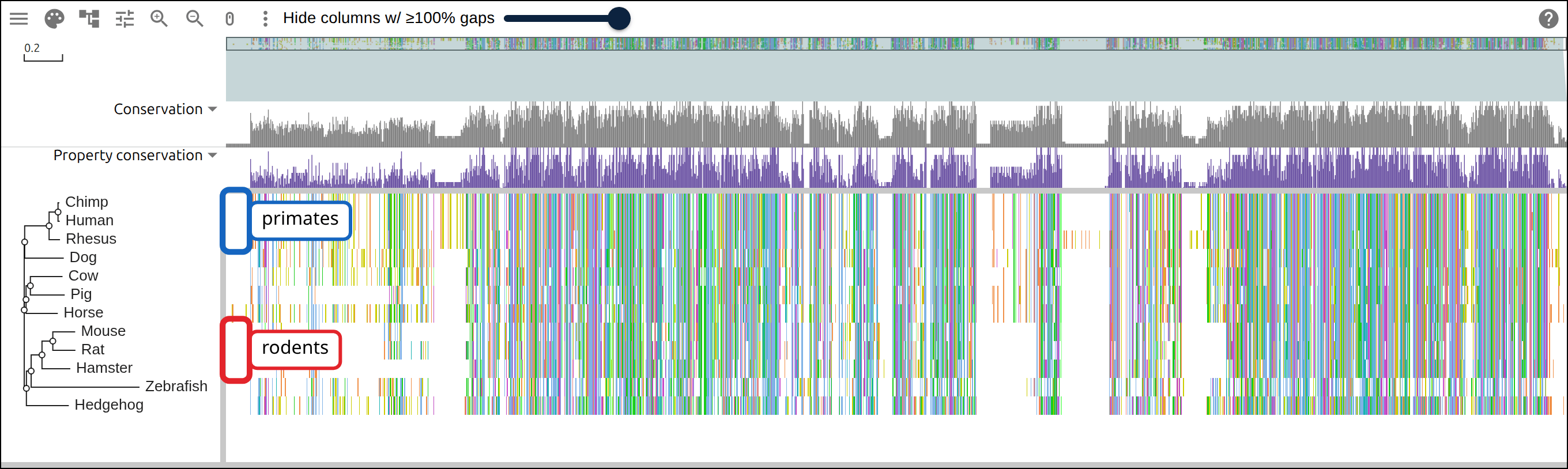
The Newick puts Zebrafish inside the rodents:
(((((Mouse:0.11672,Rat:0.11797):0.05644,Hamster:0.14779):0.05664,
Zebrafish:0.56540):0.02478,Hedgehog:0.22128):0.01141,...
Zebrafish should be the outgroup, but its branch of 0.56540, against 0.11 to 0.22 for every other tip, draws it to the next longest (long-branch attraction). This page uses the tree only to order the rows.
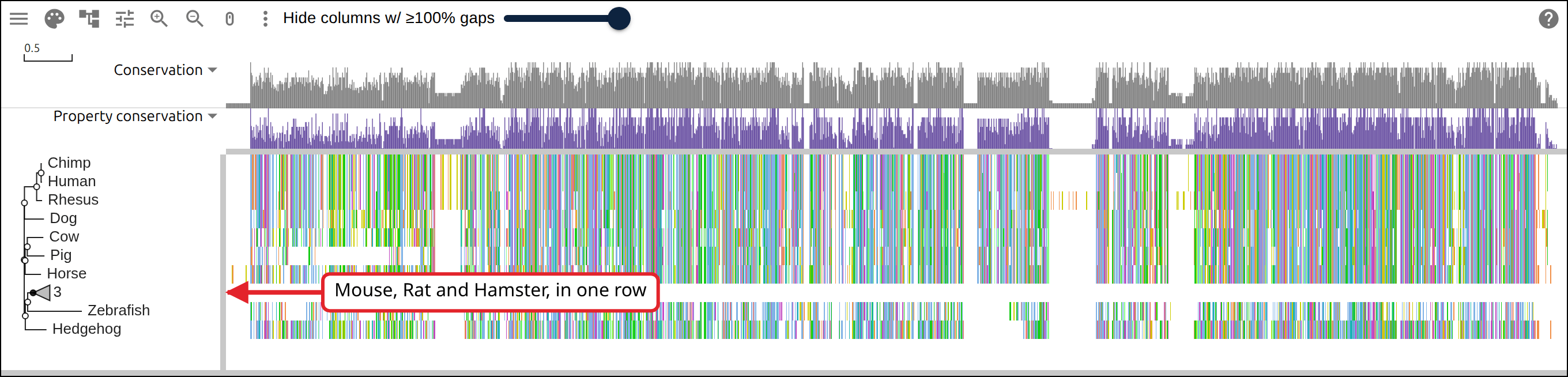
Click a node to collapse its clade into one triangle labelled with the number of tips.
5. Look up the domains
The CLI looks up InterPro’s precomputed Pfam matches for each accession:
react-msaview-cli interpro accessions.tsv -o family-domains.gffInterPro release 110.0; reading precomputed pfam matches...
[1/12] Q9C000: 9 pfam entries
...
12 fetched, 0 from /home/you/.cache/react-msaview-cli/interproFor predicted proteins InterPro has never seen, react-msaview-cli interproscan
submits the sequences to the EBI job queue and waits about fifteen minutes.
Count what came back:
grep IPR004020 family-domains.gff | cut -f1Human
Chimp
Rhesus
Dog
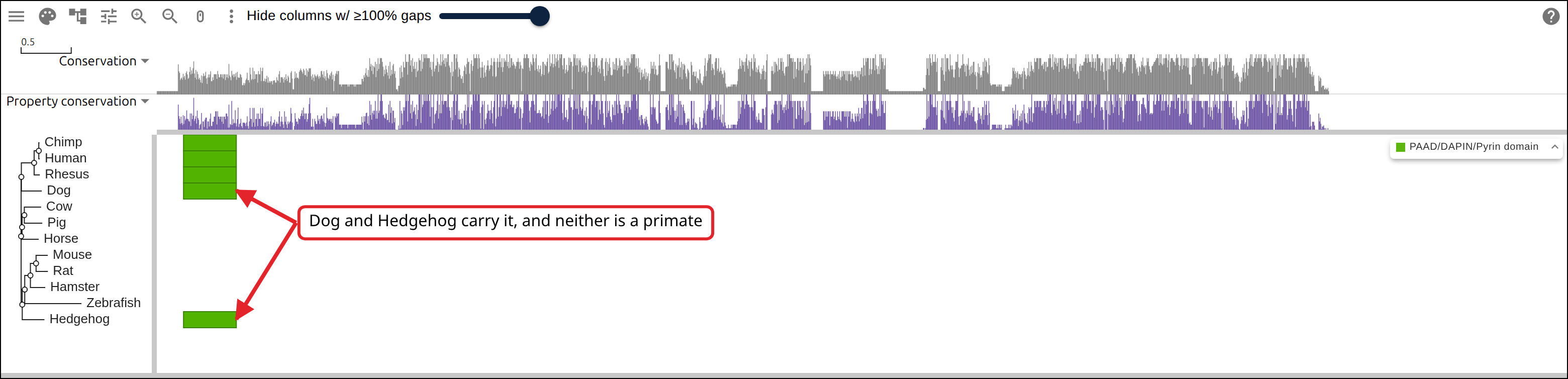
HedgehogFive rows out of twelve have the PYD, at residues 9-83 in each.
6. Open the three files
Load family.afa, family.nwk and family-domains.gff into the alignment,
tree and optional annotation slots of the
import form, as local files or URLs.
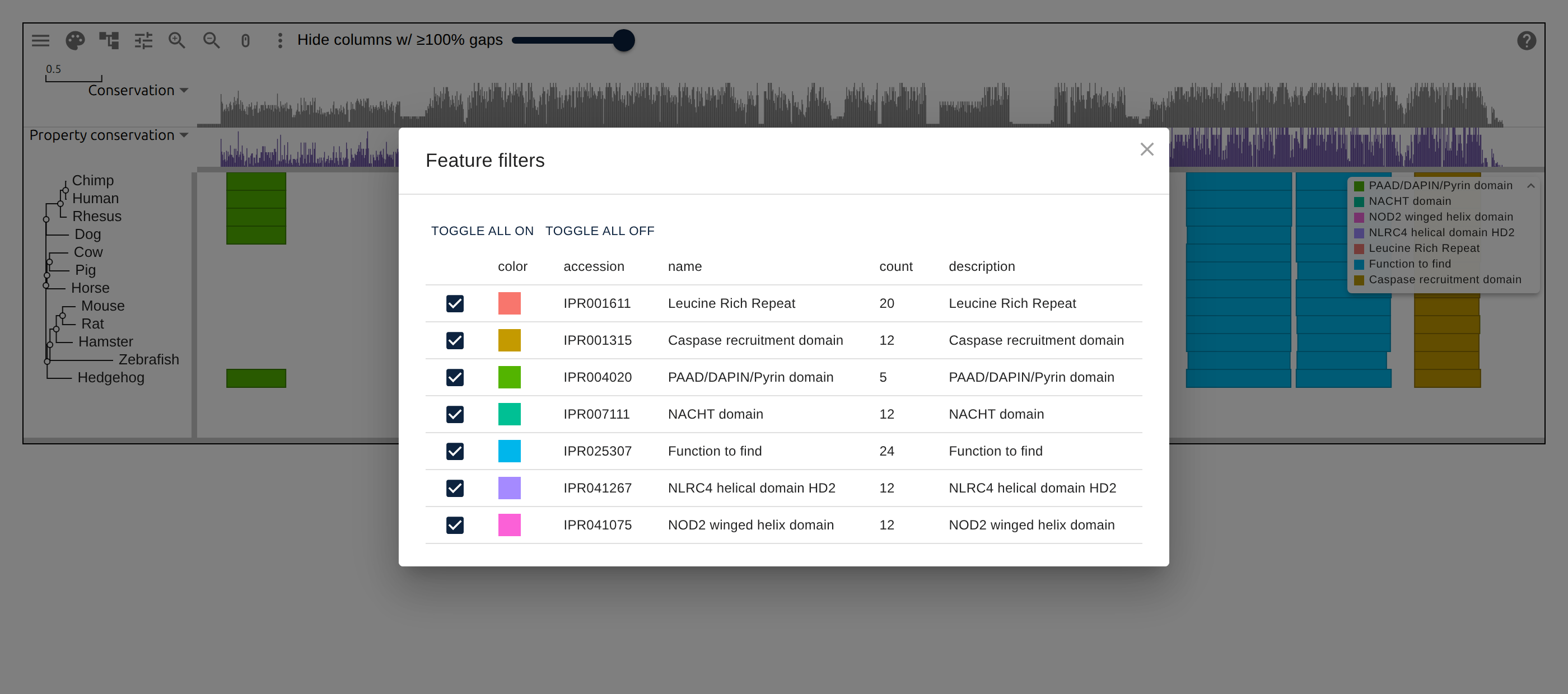
Settings → Annotations lists each InterPro accession in the GFF with a checkbox.
ggmsaview takes the same three files as
the alignment, tree and annotation arguments of msaview(). w opens the
viewer in RStudio or a notebook, and msaview_plot() draws the view as a
ggplot2 figure:
library(ggmsaview)
w <- msaview(
  msa = "https://gmod.org/JBrowseMSA/demo/data/nlrp1.aln",
  tree = "https://gmod.org/JBrowseMSA/demo/data/nlrp1.nh",
  gff = "https://gmod.org/JBrowseMSA/demo/data/nlrp1-domains.gff",
  color_scheme = "clustalx_protein_dynamic"
)
w
ggplot2::ggsave("protein-family-domains-r.png", msaview_plot(w),
  width = 12, height = 5)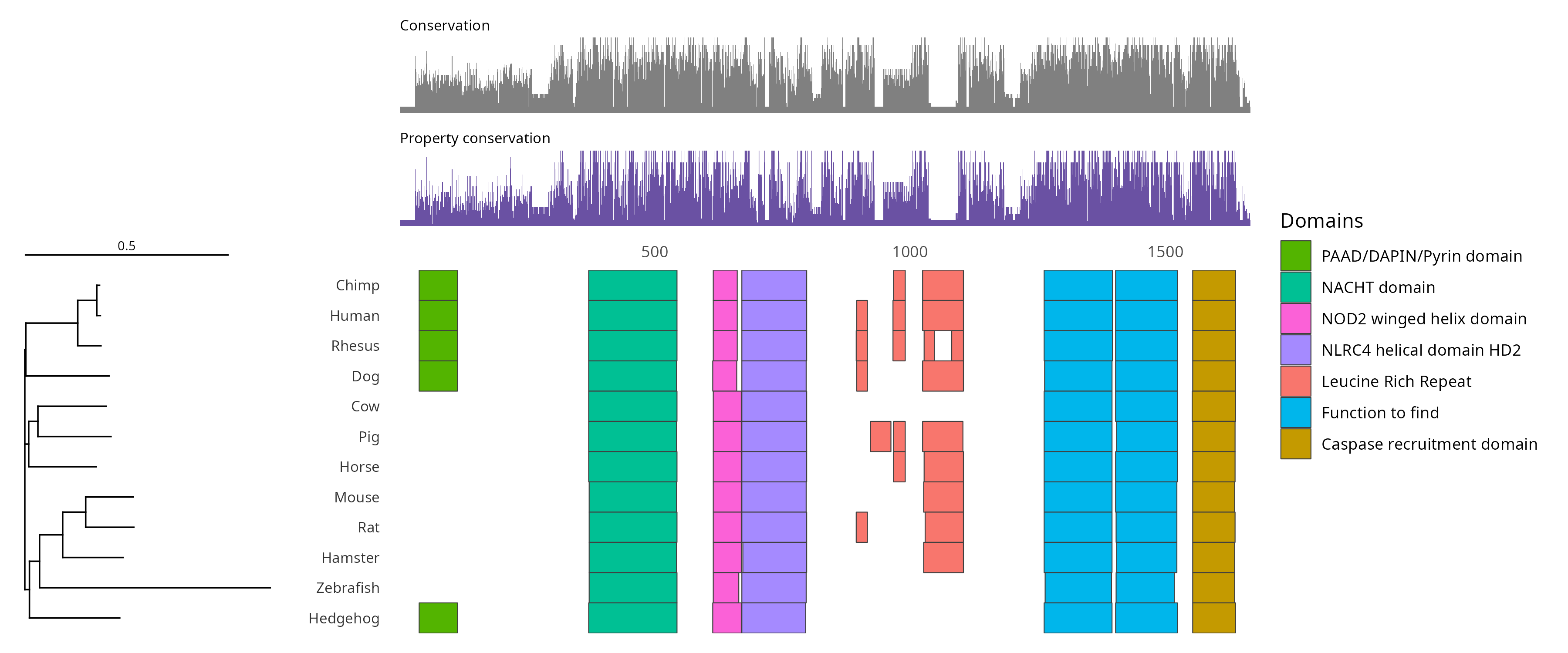
7. Filter to the pyrin domain
Uncheck every accession but IPR004020, and the overlay draws the PYD alone.
8. Compare residues with columns
InterPro reports NACHT at a different residue in each of the twelve rows:
grep IPR007111 family-domains.gff | cut -f1,4,5Human 328 497
Chimp 328 497
Rhesus 332 501
Dog 299 467
Hedgehog 296 465
Cow 294 463
Pig 162 330
Horse 328 493
Mouse 134 301
Rat 176 344
Hamster 93 258
Zebrafish 258 428Human 328 and Hamster 93 are 235 residues apart. In the viewer, Mouse, Rat, Hamster and Zebrafish begin NACHT in column 372 and the other eight rows in column 371, because the overlay maps each row’s residue coordinates through the gaps in that row before drawing.
9. Look for missing annotations
Cow, Hedgehog and Zebrafish have no leucine-rich repeats called at all:
grep IPR001611 family-domains.gff | cut -f1 | sort | uniq -c 2 Chimp
2 Dog
1 Hamster
2 Horse
3 Human
1 Mouse
3 Pig
2 Rat
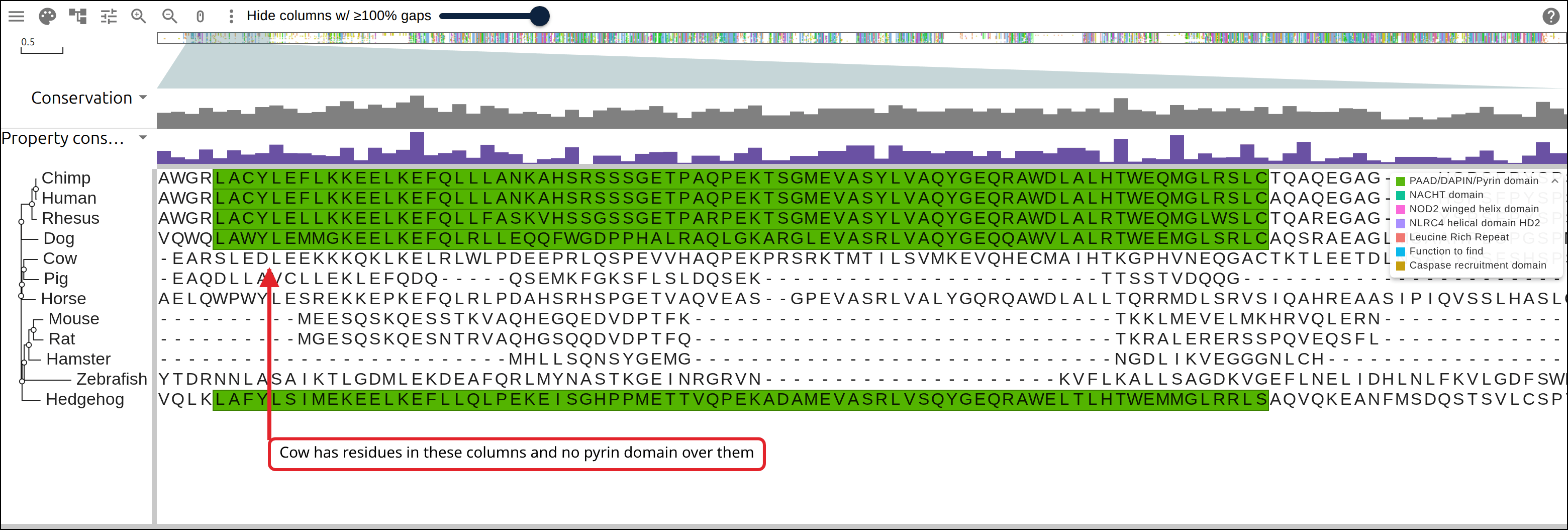
4 RhesusA blank region means the protein lacks the domain or its entry, often an unreviewed gene model, has no call there. At one letter per column, a row with residues under the blank differs from a row of gaps.
10. Share the view
An alignment this size opened from your own computer does not fit in the page
URL, so the header says Not in the link. Put the three files on a server
that sends CORS headers over HTTPS (raw.githubusercontent.com works), and name
the URLs:
{
  "msaview": {
    "type": "MsaView",
    "colWidth": 0.7,
    "colorSchemeName": "clustalx_protein_dynamic",
    "msaFilehandle": { "uri": "https://example.org/family.afa" },
    "treeFilehandle": { "uri": "https://example.org/family.nwk" },
    "gffFilehandle": { "uri": "https://example.org/family-domains.gff" },
    "highlights": [{ "start": 39, "end": 113, "label": "PYD, Pfam PF02758" }]
  }
}
URL-encode that and append it to the app as #data=. The link holds the file
addresses, so it works at any size. The optional highlights takes 1-based
inclusive columns.
Reproduce it end to end
build_protein_family.sh
runs the four commands above in order:
- It fetches one sequence per accession from UniProt and names each FASTA record by its label.
- ClustalW aligns the records and infers a neighbor-joining tree.
react-msaview-cli interprowrites InterPro’s precomputed Pfam matches for the accessions as a GFF, in each protein’s residue numbering.
It needs the tools under Prerequisites.
curl -O https://raw.githubusercontent.com/GMOD/JBrowseMSA/main/docs/tutorials/scripts/build_protein_family.sh
bash build_protein_family.sh
With no arguments the script writes the accession list above and builds the three files beside it. Point it at your own list for another family:
bash build_protein_family.sh my-accessions.tsv out/See also
- CLI
- User guide
- Data layers
- Where p53’s damaging variants fall
- The SARS-CoV-2 furin insert and PDB 6VXX
References
- Bateman A, et al. UniProt: the Universal Protein Knowledgebase in 2025. Nucleic Acids Research 53:D609-D617.
- Blum M, et al. InterPro: the protein sequence classification resource in 2025. Nucleic Acids Research 53:D444-D456.
- Larkin MA, et al. Clustal W and Clustal X version 2.0. Bioinformatics 23:2947-2948.
- Broz P, Dixit VM. Inflammasomes: mechanism of assembly, regulation and signalling. Nature Reviews Immunology 16:407-420.